
|
|
|
|
|
|
|
Customers Worldwide
 Carbones del Cerrejón Limited, Colombia
Crompton Greaves, India
Reliance Industries, India
WABCO Automotive, UK
Yigit Aku (Yigit Batteries), Turkey Carbones del Cerrejón Limited, Colombia
Crompton Greaves, India
Reliance Industries, India
WABCO Automotive, UK
Yigit Aku (Yigit Batteries), Turkey
|
||||||||
|
FMEA Executive software helps you perform Design and Process FMEA. Thoughtfully designed features help you take your FMEA effort beyond mere documentation. Your FMEA initiative becomes Effective and a Result oriented one. With FMEA Executive you will:
|
|
|||||||||
| Action Oriented Organization of FMEAs | |
|
FMEAs Executive organizes FMEAs in a tree structure, making sure that no step is skipped and no detail is left out. Each FMEA becomes an action item bank for process and design improvement. A FMEA is organized as follows:
Check the FAQs Page for more...
|
FMEA Tree Structure- Click for more information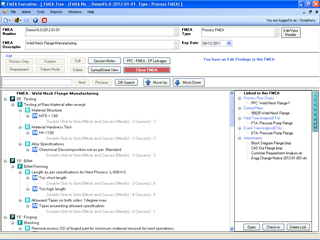
|
| Standard Rating Guidelines | |
|
Your FMEA Administrator can customize standard guidelines for rating of Severity, Occurrence and Detection based on your products and processes. All Analysts have a mouse-click popup access to these standard guidelines as they perform FMEA. Risks are correctly and uniformly stated by all. Action priorities are properly identify. Ready reference on Severity, Occurence and Detection ratings help you evaluate the risk uniformly across the FMEA team. |
| Database search: Knowledge Management | |
|
FMEA Executive commits FMEA data to a common database, building up a knowledge pool. This is your organizational asset of problem solving wisdom. Use the Database search feature
|
Extensive Keyword Search- Click for more information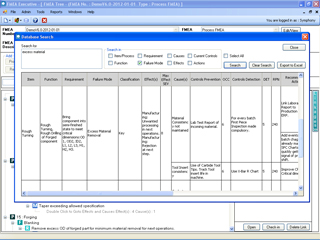
|
|
Organize peripheral information around the FMEA |
|
Tools built into FMEA Executive- Click for more information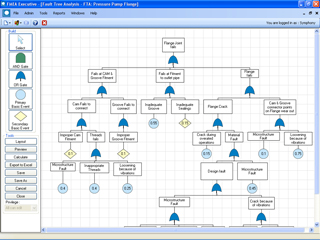
|
FMEA Executive bundles special tools that enable you create and manage
You can view linkages between Process Flow Charts, PFMEAs and Control Plans to confirm closures of all outstanding process risks. In addition, you can attach relevant freeform information to each FMEA. Attach documents, spreadsheets, images, CAD models or any other format that MS Windows can handle. These serve as a ready reference to all users of FMEA Executive. |
| Network Implementation | |
|
FMEA is a team effort. Your FMEA initiative works best when team members are able to share data, search through the database for issues and risk mitigation cycles of the past, and work on FMEAs as a team. This is easily possible in a network implementation of FMEA Executive. FMEA Executive is offered as concurrent user floating licenses spanning across the organization. |
FMEA Executive Network Licensing- Click for more information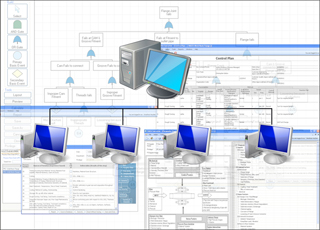
|
|
Actionable Reports |
|
Variety of Actionable Reports- Click for more information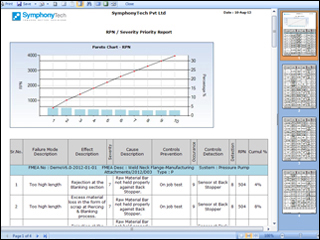
|
Actionable reports enable you
|
| Conform to Quality Standards | |
|
FMEA Executive is based on the guidelines of the 4th Edition of the AIAG FMEA manual. Thus using FMEA Executive, you conform to global Quality Standards. |
|

|
| Privacy Policy | EULA | © Symphony Technologies |
 Top Top
|


 Click here for a series of